And this is how monopolies take advantage of Open Source: Google’s plan to fork curl for no reason than to have their own version

Google is planning to reimplement parts of libcurl, a widely used open-source file transfer library, as a wrapper for Chromium’s networking API – but curl’s lead developer does not welcome the “competition”.

Issue 973603 in the Chromium bug tracker describes libcrurl,”a wrapper library for the libcurl easy interface implemented via Cronet API”.

Cronet is the Chromium network stack, used not only by Google’s browser but also available to Android applications.

The rationale is that:

Implementing libcurl using Cronet would allow developers to take advantage of the utility of the Chrome Network Stack, without having to learn a new interface and its corresponding workflow. This would ideally increase ease of accessibility of Cronet, and overall improve adoption of Cronet by first-party or third-party applications.

The Google engineer also believes that “it may also be desirable to develop a ‘crurl’ tool, which would potentially function as a substitute for the curl command in terminal or similar processes. This would be useful to troubleshoot connection issues or test the functionality of the Chrome Network Stack in a easily [sic] reproducible manner.”

Daniel Stenberg, lead developer of curl, has his doubts:

Getting basic functionality for a small set of use cases should be simple and straight forward. But even if they limit the subset to number of functions and libcurl options, making them work exactly as we have them documented will be hard and time consuming.

I don’t think applications will be able to arbitrarily use either library for a very long time, if ever. libcurl has 80 public functions and curl_easy_setopt alone takes 268 different options!

The real issue, though, is not so much Google’s ability to do this – after all, as Stenberg noted: “If they just put two paid engineers on their project they already have more dedicated man power than the original libcurl project does.”

Rather, it is why Google is reimplementing libcurl as a wrapper for its own APIs rather than simply using libcurl and potentially improving it for everyone.

“I think introducing half-baked implementations of the API will cause users grief since it will be hard for users to understand what API it is and how they differ,” Stenberg wrote. He also feels that naming the Chromium versions “libcrurl” and “crurl” will cause confusion as they “look like typos of the original names”.

Stenberg is clear that the Google team is morally and legally allowed to do this, since curl is free and open source under the MIT licence. But he added:

We are determined to keep libcurl the transfer library for the internet. We support the full API and we offer full backwards compatibility while working the same way on a vast amount of different platforms and architectures. Why use a copy when the original is free, proven and battle-tested since years?

Over to you, Google.®
Source: Kids can be so crurl: Lead dev unchuffed with Google’s plan to remake curl in its own image • The Register

Meds prescriptions for 78,000 patients left in a database with no password

A MongoDB database was left open on the internet without a password, and by doing so, exposed the personal details and prescription information for more than 78,000 US patients.

The leaky database was discovered by the security team at vpnMentor, led by Noam Rotem and Ran Locar, who shared their findings exclusively with ZDNet earlier this week.

The database contained information on 391,649 prescriptions for a drug named Vascepa; used for lowering triglycerides (fats) in adults that are on a low-fat and low-cholesterol diet.

Additionally, the database also contained the collective information of over 78,000 patients who were prescribed Vascepa in the past.

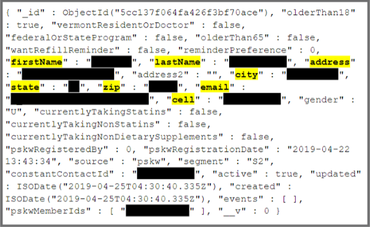
Leaked information included patient data such as full names, addresses, cell phone numbers, and email addresses, but also prescription info such as prescribing doctor, pharmacy information, NPI number (National Provider Identifier), NABP E-Profile Number (National Association of Boards of Pharmacy), and more.

HIPAA leak screenshot
Image: vpnMentor

According to the vpnMentor team, all the prescription records were tagged as originating from PSKW, the legal name for a company that provides patient and provider messaging, co-pay, and assistance programs for healthcare organizations via a service named ConntectiveRX.

Source: Meds prescriptions for 78,000 patients left in a database with no password | ZDNet

Buyer Beware: Used Nest Cams Can Let People Spy on You

A member of the Facebook Wink Users Group discovered that after selling his Nest cam, he was still able to access images from his old camera—except it wasn’t a feed of his property. Instead, he was tapping into the feed of the new owner, via his Wink account. As the original owner, he had connected the Nest Cam to his Wink smart-home hub, and somehow, even after he reset it, the connection continued.

We decided to test this ourselves and found that, as it happened for the person on Facebook, images from our decommissioned Nest Cam Indoor were still viewable via a previously linked Wink hub account—although instead of a video stream, it was a series of still images snapped every several seconds.

Here’s the process we used to confirm it:

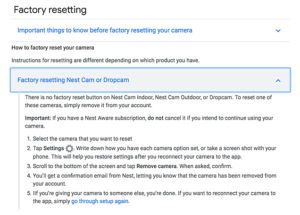
Our Nest cam had recently been signed up to Nest Aware, but the subscription was canceled in the past week. That Nest account was also linked to a Wink Hub 2. Per Nest’s instructions, we confirmed that our Aware subscription was not active, after which we removed our Nest cam from our Nest account—this is Nest’s guidance for a “factory reset” of this particular camera.

A screenshot on the Nest website with instructions for factory-resetting Nest Cams and Dropcams.
Nest’s instructions for doing a factory reset on the Nest Cam indicate that there is no factory reset button, a common feature on smart-home devices.

After that, we were unable to access the live stream with either the mobile Nest app or the desktop Nest app, as expected. We also couldn’t access the camera using the Wink app, because the camera was not online. We then created a new Nest account on a new (Android) device that had a new data connection. We followed the steps for adding the Nest Cam Indoor to that new Nest account, and we were able to view a live stream successfully through the Nest mobile app. However, going back to our Wink app, we were also able to view a stream of still images from the Nest cam, despite its being associated with a new Nest account.

In simpler terms: If you buy and set up a used Nest indoor camera that has been paired with a Wink hub, the previous owner may have unfettered access to images from that camera. And we currently don’t know of any cure for this problem.

Source: Buyer Beware: Used Nest Cams Can Let People Spy on You: Reviews by Wirecutter | A New York Times Company

Updated: patch your nest to fix it!

Hack of U.S. Border Surveillance Contractor Is Way Bigger Than the Government Lets On

Even as Homeland Security officials have attempted to downplay the impact of a security intrusion that reached deep into the network of a federal surveillance contractor, secret documents, handbooks, and slides concerning surveillance technology deployed along U.S. borders are being widely and openly shared online.

A terabyte of torrents seeded by Distributed Denial of Secrets (DDOS)—journalists dispersing records that governments and corporations would rather nobody read—are as of writing being downloaded daily. As of this week, that includes more than 400 GB of data stolen by an unknown actor from Perceptics, a discreet contractor based in Knoxville, Tennessee, that works for Customs and Border Protection (CBP) and is, regardless of whatever U.S. officials say, right now the epicenter of a major U.S. government data breach.

The files include powerpoint presentations, manuals, marketing materials, budgets, equipment lists, schematics, passwords, and other documents detailing Perceptics’ work for CBP and other government agencies for nearly a decade. Tens of thousands of surveillance photographs taken of travelers and their vehicles at the U.S. border are among the first tranches of data to be released. Reporters are digging through the dump and already expanding our understanding of the enormous surveillance apparatus that is being erected on our border.

In a statement last week, CBP insisted that none of the image data had been identified online, even as one headline declared, “Here Are Images of Drivers Hacked From a U.S. Border Protection Contractor.”

“The breach covers a huge amount of data which has, until now, been protected by dozens of Non-Disclosure Agreements and the (b)(4) trade-secrets exemption which Perceptics has demanded DHS apply to all Perceptics information,” DDOS team member Emma Best, who often reports for the Freedom of Information site MuckRock, told Gizmodo.

(Best has also contributed reporting on WikiLeaks for Gizmodo.)

Despite the government’s attempt to downplay the breach, the Perceptics files, she said, “include schematics, plans, and reports for DHS, the DEA, and the Pentagon as well as foreign clients.”

While the files can be viewed online, according to Best, DDOS has experienced nearly a 50 percent spike in traffic from users who’ve opted to download the entire dataset.

“We’re making these files available for public review because they provide an unprecedented and intimate look at the mass surveillance of legal travel, as well as more local surveillance of turnpike and secure facilities,” Best said. “Most importantly they provide a glimpse of how the government and these companies protect our information—or, in some cases, how they fail to.”

Neither CBP nor Perceptics immediately responded to a request for comment.

Source: Hack of U.S. Border Surveillance Contractor Is Way Bigger Than the Government Lets On

Millions of Dell PCs Vulnerable to Flaw in SupportAssist software

Millions of PCs made by Dell and other OEMs are vulnerable to a flaw stemming from a component in pre-installed SupportAssist software. The flaw could enable a remote attacker to completely takeover affected devices.

The high-severity vulnerability (CVE-2019-12280) stems from a component in SupportAssist, a proactive monitoring software pre-installed on PCs with automatic failure detection and notifications for Dell devices. That component is made by a company called PC-Doctor, which develops hardware-diagnostic software for various PC and laptop original equipment manufacturers (OEMs).

“According to Dell’s website, SupportAssist is preinstalled on most of Dell devices running Windows, which means that as long as the software is not patched, this vulnerability probably affects many Dell users,” Peleg Hadar, security researcher with SafeBreach Labs – who discovered the breach – said in a Friday analysis.

Source: Millions of Dell PCs Vulnerable to Flaw in Third-Party Component | Threatpost

Chrome is the biggest snoop of all on your computer or cell phone – so switch browser before there is no alternative any more

You open your browser to look at the Web. Do you know who is looking back at you?

Over a recent week of Web surfing, I peered under the hood of Google Chrome and found it brought along a few thousand friends. Shopping, news and even government sites quietly tagged my browser to let ad and data companies ride shotgun while I clicked around the Web.

This was made possible by the Web’s biggest snoop of all: Google. Seen from the inside, its Chrome browser looks a lot like surveillance software.

Lately I’ve been investigating the secret life of my data, running experiments to see what technology really gets up to under the cover of privacy policies that nobody reads. It turns out, having the world’s biggest advertising company make the most popular Web browser was about as smart as letting kids run a candy shop.

It made me decide to ditch Chrome for a new version of nonprofit Mozilla’s Firefox, which has default privacy protections. Switching involved less inconvenience than you might imagine.

My tests of Chrome vs. Firefox unearthed a personal data caper of absurd proportions. In a week of Web surfing on my desktop, I discovered 11,189 requests for tracker “cookies” that Chrome would have ushered right onto my computer but were automatically blocked by Firefox. These little files are the hooks that data firms, including Google itself, use to follow what websites you visit so they can build profiles of your interests, income and personality.

Chrome welcomed trackers even at websites you would think would be private. I watched Aetna and the Federal Student Aid website set cookies for Facebook and Google. They surreptitiously told the data giants every time I pulled up the insurance and loan service’s log-in pages.

And that’s not the half of it.

Look in the upper right corner of your Chrome browser. See a picture or a name in the circle? If so, you’re logged in to the browser, and Google might be tapping into your Web activity to target ads. Don’t recall signing in? I didn’t, either. Chrome recently started doing that automatically when you use Gmail.

Chrome is even sneakier on your phone. If you use Android, Chrome sends Google your location every time you conduct a search. (If you turn off location sharing it still sends your coordinates out, just with less accuracy.)

Firefox isn’t perfect — it still defaults searches to Google and permits some other tracking. But it doesn’t share browsing data with Mozilla, which isn’t in the data-collection business.

At a minimum, Web snooping can be annoying. Cookies are how a pair of pants you look at in one site end up following you around in ads elsewhere. More fundamentally, your Web history — like the color of your underpants — ain’t nobody’s business but your own. Letting anyone collect that data leaves it ripe for abuse by bullies, spies and hackers.

[…]

Choosing a browser is no longer just about speed and convenience — it’s also about data defaults.

It’s true that Google usually obtains consent before gathering data, and offers a lot of knobs you can adjust to opt out of tracking and targeted advertising. But its controls often feel like a shell game that results in us sharing more personal data.

I felt hoodwinked when Google quietly began signing Gmail users into Chrome last fall. Google says the Chrome shift didn’t cause anybody’s browsing history to be “synced” unless they specifically opted in — but I found mine was being sent to Google and don’t recall ever asking for extra surveillance. (You can turn off the Gmail auto-login by searching “Gmail” in Chrome settings and switching off “Allow Chrome sign-in.”)

After the sign-in shift, Johns Hopkins associate professor Matthew Green made waves in the computer science world when he blogged he was done with Chrome. “I lost faith,” he told me. “It only takes a few tiny changes to make it very privacy unfriendly.”

When you use Chrome, signing into Gmail automatically logs in the browser to your Google account. When “sync” is also on, Google receives your browsing history.

There are ways to defang Chrome, which is much more complicated than just using “Incognito Mode.” But it’s much easier to switch to a browser not owned by an advertising company.

Like Green, I’ve chosen Firefox, which works across phones, tablets, PCs and Macs. Apple’s Safari is also a good option on Macs, iPhones and iPads, and the niche Brave browser goes even further in trying to jam the ad-tech industry.

What does switching to Firefox cost you? It’s free, and downloading a different browser is much simpler than changing phones.

[…]

And as a nonprofit, it earns money when people make searches in the browser and click on ads — which means its biggest source of income is Google. Mozilla’s chief executive says the company is exploring new paid privacy services to diversify its income.

Its biggest risk is that Firefox might someday run out of steam in its battle with the Chrome behemoth. Even though it’s the No. 2 desktop browser,with about 10 percent of the market, major sites could decide to drop support, leaving Firefox scrambling.

If you care about privacy, let’s hope for another David and Goliath outcome.

Source: Google is the biggest snoop of all on your computer or cell phone