US Navy Swarm UAVs

The U.S. Naval Air Systems Command (NAVAIR) recently demonstrated autonomous operations by multiple “swarms” of unmanned air and ground vehicles, unattended ground sensors, video cameras and other devices linked together in an intelligent network powered by EdgeFrontier platform technologies from Augusta Systems, Inc.

via NAVAIR And Augusta Demo Operations Of Multiple Swarms Of UAVs And Sensors.

Basically using one operator to control a fleet of aircraft.

The RAF did tests on swarm UAV operations from an airborne controller in a Tornado in 2007 using QinetiQ technology called Autonomy

I wonder if they were using the fluid dynamics model to control these swarms?

Booming business, steal and sell to governments

An interesting article – if you have bank customer information, which you’ve stolen from a bank, governments will pay you for that information.

If you’re a spy you’d be shot for it. It’s not right that the Dutch government is using tax payers money on criminally attained information to find people who have foreign cash assets. In a court of law, evidence obtained this way is also not allowed and for good reason.

Booming business, steal and sell to governments « Frederik Van Lierde.

OBDII and iMFD Data Logging

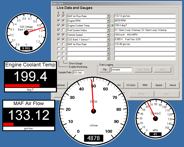
Any car built this century has an OBDII interface. This allows mechanics to plug in their laptop and get real time engine data. Lots of information about the running of the car. Nowadays there are quite a few USB / Bluetooth OBD-II connectors, which allow streaming of this data to your laptop, Garmin navigation system or iPod / iPhone.

PLX Devices Inc. sells the PLX Logger Software, as well as devices to show the data on.

ODBCOM has software going for only $85,-

Scantool sells software as well as displays. The software goes for $120,-

Its dashcommand software ($40) allows you to create custom skins and settings for your own digital dashboard

Auterra has the DynoScan Windows software going – including a google earth interace

It also sells a display unit

Then there’s PCMScan by Palmer

All these tools have different featuresets and support different cars…

Why computers suck at maths

This article explores why computers can’t do floating point maths, which is what makes Excel and all those online calculators such lousy mathematicians – basically because computers are binary, they can’t calculate anything after a decimal point, so the workaround is to put the number including the decimal point in a register of a certain size (say 32 bits) and reserve a few parts of the register for the decimal. Should the number you need to calculate become too big for the register, you run into trouble with rounding errors, which can compound. It then shows how nasty compound errors can become by citing the example of why a Patriot missle battery missed a Scud attack, resulting in the deaths of 24 people.

Why computers suck at maths | News | TechRadar UK.

DTIC

DTIC Online Access Controlled is the central facility for the acquisition, storage, retrieval and dissemination of scientific and technical information supporting the Research and Engineering needs of the Department of Defense. Maintained by the Defense Technical Information Center DTIC, a recognized leader in information and knowledge management. This site provides access to DTIC’s collections, online subscriptions, R&E Resources and more.

via DTIC Logon.

Dutch Hacker informs Jailbroken iPhones that they’re insecure

Fantastic – this guy port scans the T-Mobile range and finds the jailbroken iphones on the network, then SSH’s in using the default password and blips a message to the iphone telling the user the iphone has been hacked. Users can find out how to close the hole by visiting a website and paying EUR. 5,- using Paypal. He states that users don’t have to pay and he won’t do anything bad to them, so it isn’t exactly ransom.

What’s the hole? Most idiots who jailbreak fail to change the default root password. Duh!

Dutch Hacker Holds Jailbroken iPhones Hostage For €5 Ransom While Exposing Security Vulnerability – Iphone jailbreak hack – Gizmodo.

Parents not allowed to watch their children play – UK

2 council run adventure playgrounds in Watford are off limits to parents. Only “play workers” are allowed to supervise the children playing there. For some reason, the local council thinks it’s not appropriate for parents to be in the same area as playing 5 – 15 year olds.

Let’s fuel the paedophile paranoia some more shall we?!

Brave New World arrives In Watford • The Register.

UK adopts French 3 strikes law

Looks like the British are blithely going where the French couldn’t go by adopting a 3 strikes rule for illegal filesharers. First you get warning letters and then you get disconnected from the internet.

Not only does this mean that basically your internet connection will be monitored for this kind (and what other?) behaviour, but also that people will be forced to switch to encrypted internet connections, making police and MI5 work much more difficult.

Lord Mandelson sets date for blocking filesharers’ internet connections | Technology | guardian.co.uk.

Windows 7 Shortcut keys

This is a huge and useful list:

The full list of keyboard shortcuts includes:

  • Win+Home: Clear all but the active window.
  • Win+Space: All windows become transparent so you can see through to the desktop.
  • Win+Up arrow: Maximize the active window.
  • Shift+Win+Up arrow: Maximize the active window vertically.
  • Win+Down arrow: Minimize the window/Restore the window if it’s maximized.
  • Win+Left/Right arrows: Dock the window to each side of the monitor.
  • Shift+Win+Left/Right arrows: Move the window to the monitor on the left or right.

You can also interact with windows by dragging them with the mouse:

  • Drag window to the top: Maximize
  • Drag window left/right: Dock the window to fill half of the screen.
  • Shake window back/forth: Minimize everything but the current window.
  • Double-Click Top Window Border (edge): Maximize window vertically.

Taskbar Shortcuts

In Windows 7, using the Windows key along with the numbers 1-9 will let you interact with the applications pinned to the taskbar in those positions – for example, the Windows key + 4 combination would launch Outlook in this example, or Win+Alt+4 can be used to get quick access to the Outlook Jump List from the keyboard.

You can use any of these shortcut combinations to launch the applications in their respective position on the taskbar, or more:

  • Win+number (1-9): Starts the application pinned to the taskbar in that position, or switches to that program.
  • Shift+Win+number (1-9): Starts a new instance of the application pinned to the taskbar in that position.
  • Ctrl+Win+number (1-9): Cycles through open windows for the application pinned to the taskbar in that position.
  • Alt+Win+number (1-9): Opens the Jump List for the application pinned to the taskbar.
  • Win+T: Focus and scroll through items on the taskbar.
  • Win+B: Focuses the System Tray icons

In addition, you can interact with the taskbar using your mouse and a modifier key:

  • Shift+Click on a taskbar button: Open a program or quickly open another instance of a program.
  • Ctrl+Shift+Click on a taskbar button: Open a program as an administrator.
  • Shift+Right-click on a taskbar button: Show the window menu for the program (like XP does).
  • Shift+Right-click on a grouped taskbar button: Show the window menu for the group.
  • Ctrl+Click on a grouped taskbar button: Cycle through the windows of the group.

More Useful Hotkeys You Should Know

The new hotkey goodness didn’t stop with the taskbar and moving windows around—one of the best new hotkeys in Windows 7 is the fact that you can create a new folder with a hotkey. Just open up any Windows Explorer window, hit the Ctrl+Shift+N shortcut key sequence, and you’ll be rewarded with a shiny “New Folder” ready for you to rename.

Here’s a few more interesting hotkeys for you:

  • Ctrl+Shift+N: Creates a new folder in Windows Explorer.
  • Alt+Up: Goes up a folder level in Windows Explorer.
  • Alt+P: Toggles the preview pane in Windows Explorer.
  • Shift+Right-Click on a file: Adds Copy as Path, which copies the path of a file to the clipboard.
  • Shift+Right-Click on a file: Adds extra hidden items to the Send To menu.
  • Shift+Right-Click on a folder: Adds Command Prompt Here, which lets you easily open a command prompt in that folder.
  • Win+P: Adjust presentation settings for your display.
  • Win+(+/-): Zoom in/out.
  • Win+G: Cycle between the Windows Gadgets on your screen.

The Master List of New Windows 7 Shortcuts – Windows – Lifehacker.

Fixing stuff goes faster with AR

Using Augmented Reality goggles, powered on an Android platform, marines are able to maintain their vehicles 46% faster than using a laptop with technical manuals.

The AR system provides label names to each object, shows a 3D model of the tool you need and gives instructions for specifica tasks overlaid on the camera view of what you are looking at.

Technology Review: Faster Maintenance with Augmented Reality.

Evolving swarm intelligence in robots

The Lausanne university in Switserland has moved from the software to the reality: they’ve managed to get robots to evolve and learn behaviours, as well as the behaviour to decieve and cooperate through communication (flashing lights) and movement. It’ s a very interesting experiment, showing that robots are getting smarter every day and are now showing some very very lifelike traits.

Darwin’s Robots | h+ Magazine.

Windows 7 officially supports logon UI background customization

Although this functionality was designed with OEMs in mind, it is pretty easy to turn on and off using regedit and some images lying around your hard drive.

First, a check is made to determine if the customization functionality is enabled or not. More precisely, a DWORD value named OEMBackground in the HKLM\Software\Microsoft\Windows\CurrentVersion\Authentication\LogonUI\Background key is checked. Its data, of Boolean type, defines whether or not this behavior is turned on, i.e. 1 for enabled, 0 for disabled. This value may not exist by default, depending on your system.

Afterwards, if customization is enabled, the primary monitor’s screen height and width are retrieved via calls to GetSystemMetrics. These values are used in the computation of the screen width (w)/height (h) ratio. For example, my desktop resolution is 1920×1200. The ratio, computed by the division of w/h, is 1.6:1.

The result of this computation is looked up in an internal table that drives what image to load on disk. Although I don’t have a large enough monitor to test, it appears resolutions higher than 1920×1200 will force the loading and zooming of an image of closest compatibility (i.e. same ratio, smaller image).

As this is an OEM feature images are derived from %windir%\system32\oobe\info\backgrounds. Like the registry value, this folder may not exist by default. The following files (sorted by width-to-height ratio) are supported in this folder:

  • backgroundDefault.jpg
  • background768x1280.jpg  (0.6)
  • background900x1440.jpg  (0.625)
  • background960x1280.jpg  (0.75)
  • background1024x1280.jpg (0.8)
  • background1280x1024.jpg (1.25)
  • background1024x768.jpg  (1.33-)
  • background1280x960.jpg  (1.33-)
  • background1600x1200.jpg (1.33-)
  • background1440x900.jpg  (1.6)
  • background1920x1200.jpg (1.6)
  • background1280x768.jpg  (1.66-)
  • background1360x768.jpg  (1.770833-)

NOTE: Images must be less than 256kb in size. Thanks for pushing me to investigate, Jay C.

The backgroundDefault.jpg image is loaded and stretched-to-fit when a resolution/ratio-specific background cannot be found. The other resolution/ratio-specific files are self-explanatory. If the background cannot be loaded (e.g. image physically too large, incorrect ratio, etc.), the default SKU-based image is loaded from imagesres.dll. You’ll see a Windows Server-themed grayish background in there, too, suggesting this functionality is not specific to client SKUs.”

Windows 7 to officially support logon UI background customization – Within Windows.

Dutch Gov’t Has No Idea How To Delete Tapped Calls

“The law in the Netherlands says that intercepted phone calls between attorneys and their clients must be destroyed. But the Dutch government has been keeping under wraps for years that no one has the foggiest clue how to delete them Google translation. Now, an email PDF from the National Police Services Agency KLPD has surfaced, revealing that the working of the technology in question is a NetApp trade secret. The Dutch police are now trying to get their Israeli supplier Verint to tell them how to delete tapped calls and comply with the law. Meanwhile, attorneys in the Netherlands remain afraid to use their phones.

via Slashdot Your Rights Online Story | Dutch Gov’t Has No Idea How To Delete Tapped Calls.

iPhone 91 PC Suite

The PC Suite is also available for Windows Mobile and Android and offers and alternative way to handle your phone. For the iPhone it offers a way out of itunes and gives you the ability to mass SMS, back up your entire iphone (including cydia apps), a ringtone community and maker, a file explorer and a whole lot more.

In order to make it English, you may have to rename some language files in the directory C:\Program Files\NetDragon\91 Mobile\iPhone\LangPack (all except the en-US.lang – if you don’t rename, the updater will try to redownload them)

PandaApp.com | manage your smart phone easily and safely!.